Home network and Wi-Fi
Wi-Fi standards, bands, coverage and the diagnostics that actually narrow down a slow connection.
Most home network problems come down to one of three layers: the radio link between a device and the access point, the path through the router, or the address the packet is trying to reach. Symptoms look alike across all three, which is why replacing hardware so often changes nothing.
These guides separate the layers so a fix can be aimed at the right one. If something is slow right now, start with the diagnostic order of operations. If you are choosing hardware, start with the band and standards guides.
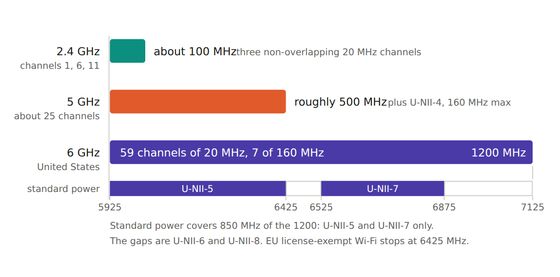
2.4 GHz vs 5 GHz vs 6 GHz: which band for which device
How to split devices across 2.4, 5 and 6 GHz: real path loss numbers, the DFS stability tax, 6 GHz power caps, and the band steering setting that breaks IoT.
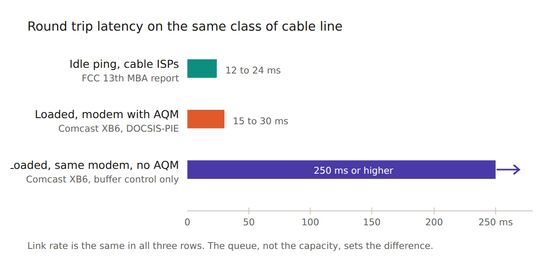
Bufferbloat, and why a fast line still stutters
A 900 Mbit/s speed test and a stuttering video call are both true. What bufferbloat is, how to measure loaded latency, and what fq_codel, CAKE and L4S each fix.
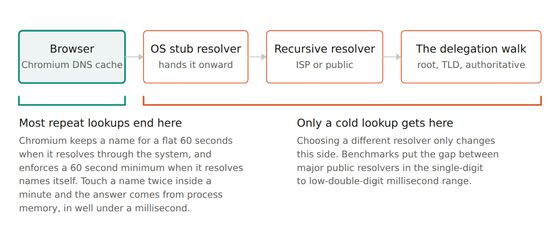
DNS explained, and whether changing your resolver helps
How DNS resolution, TTL and caching really work, why a faster resolver almost never speeds up browsing, and the three reasons that do justify switching.
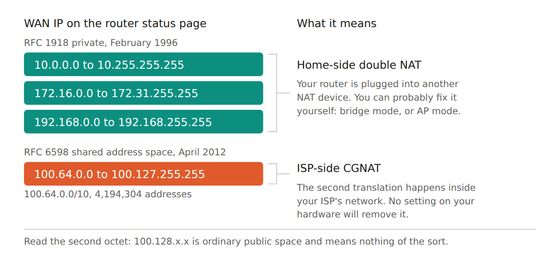
Double NAT and CGNAT: how to tell which you have, and what actually breaks
Your router's WAN IP settles it: an RFC 1918 address means home-side double NAT, 100.64.0.0/10 means ISP CGNAT. Here is what each breaks and what fixes it.
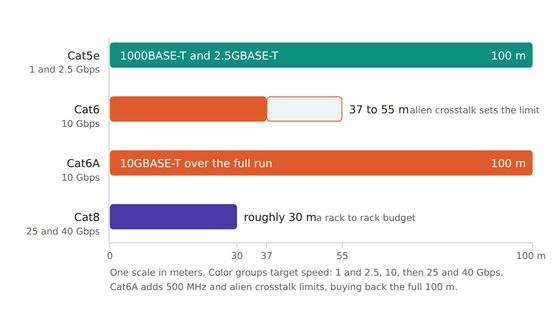
Ethernet cable categories: Cat5e through Cat8, and what you need
Cat5e carries Gigabit and 2.5 Gbps at 100 meters, Cat6A is the honest upgrade for a wall run, and Cat8 stops at 30 meters for speeds no home device reaches.
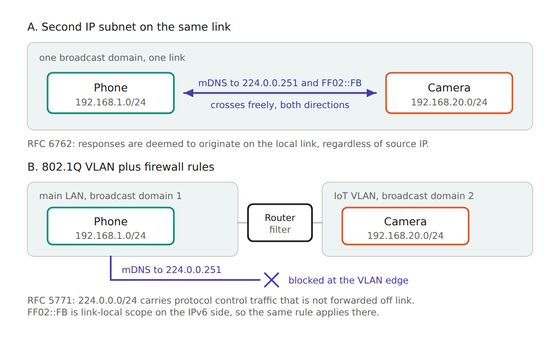
Guest networks and keeping smart home gear off your main LAN
A guest SSID is a firmware convenience, not a security boundary. How client isolation, a second subnet and an 802.1Q VLAN differ, and what each one breaks.

IPv6 at home: what changes and what to do about it
IPv6 gives every device a routable address and retires NAT, but routable is not the same as reachable. What changes on a home line, and what to check.

Mesh vs range extender vs powerline: an honest comparison
Extenders halve throughput on a shared radio, mesh only escapes that with a dedicated backhaul or a cable, and powerline speed depends on your house wiring.

Port forwarding and UPnP: how they work and what they expose
A forwarded port is a permanent NAT rule that accepts anyone. UPnP lets any device on your LAN write one with no password. Here is what that costs you.

Router firmware and the security lifecycle
A router's real expiry date is the vendor's published security update deadline, not the day it stops passing traffic. How to find that date and act on it.

Router, modem and gateway: what each one actually does
A modem converts the line signal, a router forwards packets, and NAT and DHCP are separate jobs on top. What bridge mode changes, and why double NAT happens.

VPN protocols at home: where WireGuard, OpenVPN and IKEv2 differ
WireGuard, OpenVPN and IKEv2 barely differ in speed on a home line. They differ in how they fail, and MTU causes most reports of a slow VPN.

Why your Wi-Fi is slow: a diagnostic order of operations
Diagnose slow Wi-Fi in cost order, starting with a wired baseline test and ending with new hardware, so you only spend money once you have proof.

Wi-Fi 6 vs Wi-Fi 6E vs Wi-Fi 7
Wi-Fi 6E is just Wi-Fi 6 on the 6 GHz band and Wi-Fi 7 adds 320 MHz channels plus MLO, but spectrum rules and your broadband plan decide the rest.

Wi-Fi roaming and band steering: the client decides
Roaming is a client side decision. What 802.11k, 802.11v and 802.11r each really do, why band steering is a withheld probe, and where minimum RSSI fails.

Wi-Fi security: WPA2, WPA3 and what actually protects you
WPA2 hands attackers a capturable handshake to crack offline. WPA3's SAE removes it, but transition mode gives the hole back. What to set and why.


